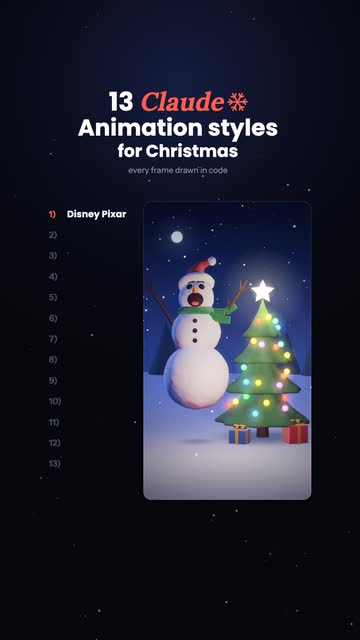
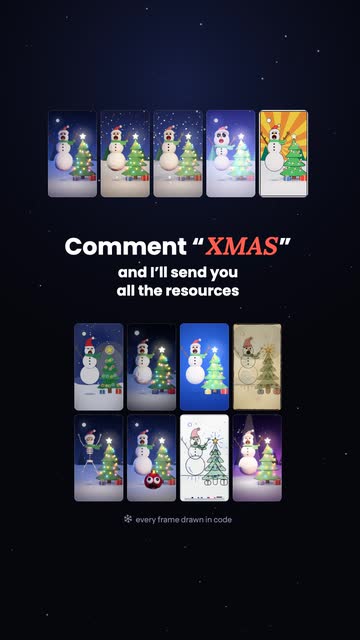
13 ClaudeAnimation stylesfor Christmas
One prompt to make your own story in any of these styles.
Every clip in the reel was drawn by code that Claude wrote. No image or video model made any of it. Pick a style, add your story, and copy the prompt. Claude does the rest.
- 13styles to pick from
- 1prompt
- 0video models
Before you start
- Open Claude Code in a new, empty folder.
- Install the anidoodle skill. It is the open-source drawing engine Claude uses (github.com/alexgreensh/anidoodle). Paste these two lines into Claude Code, one at a time:
/plugin marketplace add alexgreensh/anidoodle
/plugin install anidoodle@alexgreensh-anidoodle
- You also need Node.js 20 or newer and ffmpeg. Not sure if you have them? Carry on. The prompt tells Claude to check and to say what is missing.
Build your prompt
Pick a style
Tap any of the 13. The prompt in step 3 changes to match the one you pick.
1 · Disney PixarThe 3D animated feature look
Good for: character stories with a feeling in them
Write your story
Copy your prompt
This prompt is written for the style you picked: Disney Pixar. Pick a different style in step 1 and it rewrites itself. Your story is filled in too. Paste it into Claude Code as one message.
Use the anidoodle skill to make a short animated video of my story. Every frame must be drawn in code. Do not use any image or video generation model.

MY STORY
[Write your story here in a few sentences]

THE STYLE
A 3D animated feature film. Build the scene in three.js. Give soft surfaces a cloth-like sheen, and push round shapes slightly off-round so they look made, not computed. Light it softly: one cool key light, a gentle fill and a little fog for depth. After the 3D pass, add a glow on every light source, gentle bloom, a vignette and light film grain. Smooth motion at 60 fps.

THE VIDEO
- Vertical, 1080×1920, 60 fps, 20 to 30 seconds long, exported as an MP4 I can post as a reel.
- 3 to 6 shots. One set and a fixed camera, unless the story truly needs more.
- Characters made of simple shapes. If my story has realistic people or animals, turn them into simple characters.
- One action per shot, with a clear before and after. The big moment of each shot must change the character's outline.
- Someone watching with the sound off should still follow the story.
- One short caption on screen per shot. Keep captions, titles and faces between x 147 and x 934, so tall phones do not crop them.

HOW TO BUILD IT
1. Check that Node 20 or newer and ffmpeg are installed, and tell me if either is missing. Then set up a new anidoodle project in a folder named after the story and install what it needs.
2. Turn the story into a shot list. For each shot give its length in seconds, what we see, what moves, and its caption.
3. Build the characters and the set once, in the style above. Generate any textures as data, with no image files.
4. Show me the shot list and two stills: the main character at rest, and at the biggest moment of the story. Then stop and wait for my OK. This is the only time you stop.
5. Animate every shot. Write the motion as a pure function of time, so the same time always gives the same pose and nothing depends on the previous frame. Give every big move a short wind-up before it, and let it settle after.
6. Before you render, make a contact sheet with the key frame of every shot. Look at it yourself and fix what is wrong: a wrong expression, anything black or inside out, blown-out lights, anything cut off by the frame.
7. Write the music as a script that synthesises a WAV file with no samples. Use an original tune or one in the public domain. Set the tempo so every cut lands on a bar line, and accent the big moment of each shot.
8. If the project folder contains voice.mp3 or voice.wav, use it as narration: cut it at its pauses, start each line with its shot, never speed a line up by more than 1.2×, and lower the music whenever the voice speaks. If there is no voice file, skip this step.
9. Render the video, mix the sound to about −14 LUFS, and join picture and sound into one H.264 MP4 with AAC audio, tagged bt709.

WHEN YOU ARE DONE
Tell me where the MP4 and the contact sheet are, and list anything you were not happy with.
What happens after you paste it
- Claude checks your tools and sets up the project.
- It shows you a shot list and two still pictures, then waits. Reply OK, or say what to change in plain words.
- It animates the shots, checks its own contact sheet, writes the music and renders.
- You get an MP4, ready to post.
Want a narrator? Record or generate one voice file with a line for each shot, and save it as voice.mp3 in the project folder before you reply OK. Claude cuts it to fit the shots. The voice in my reel is from ElevenLabs.
If something looks wrong
Tell Claude in plain words. These are the problems I hit while making the reel.
A character looks cheap or uncanny
It is probably too realistic. Code draws simple shapes well and realistic people badly. Ask for a simpler character made of basic shapes.
Something is black or inside out
Tell Claude which part. On my tree the cause was a profile drawn from top to bottom, when it has to run from bottom to top.
Eyes or eyebrows point the wrong way
Tell Claude to rotate the face parts in the head’s own space. My snowman looked angry at first for this kind of reason.
The build stops with an error that mentions anidoodle-font
Paste the error back to Claude. On version 0.10.1 a bundled font broke the build until Claude patched one line in tools/build-page.mjs.
The voice says a word wrong
Spell it the way it sounds in your script, such as “three D” for “3D”, and generate the whole script in one go.